
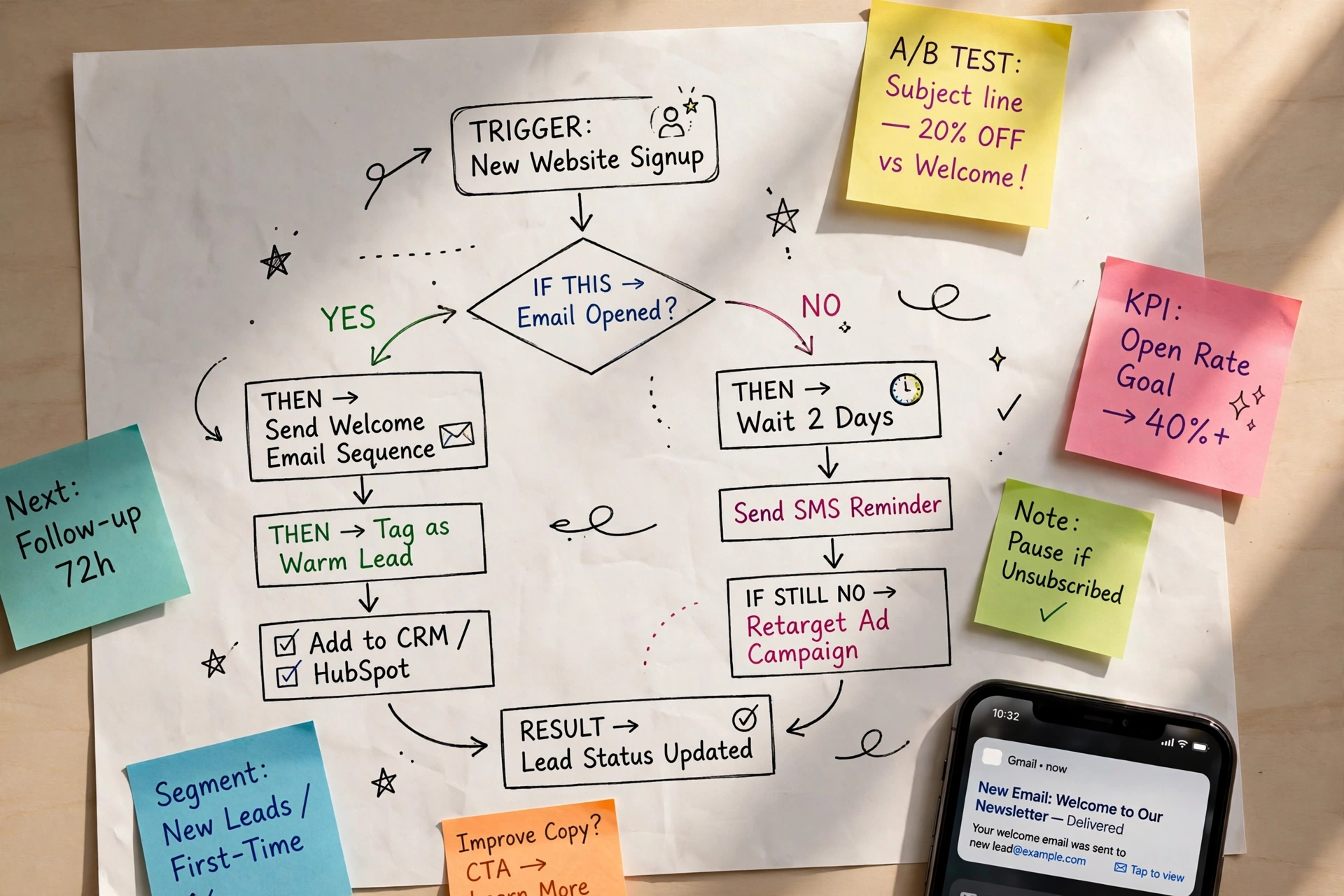
The short answer: marketing automation is software that follows rules you set to send the right message to the right person at the right moment — automatically. When a contact joins your list, clicks a link, visits a pricing page, or leaves items in a cart, the system notices, checks your conditions, and responds: sending an email, adding a tag, waiting two days, branching down a different path, or alerting you. You write the logic once. The machine runs it for every contact, every day, whether you are at your desk or not.
That definition matters because the phrase gets used loosely. Vendors apply it to everything from a simple scheduled newsletter to enterprise lead-scoring platforms. Underneath the marketing language, every automation tool is the same small engine — and once you understand that engine, the whole category gets much easier to evaluate.
The mechanism: triggers, conditions, and actions
Strip away the visual builders and drag-and-drop canvases and every marketing automation workflow reduces to three parts:
-
Trigger — the event that starts the workflow. Something a contact does (or that happens to them): signing up for your list, submitting a form, making a purchase, abandoning a cart, clicking a specific link, not opening anything for 90 days. The trigger is the door into the workflow. No trigger, no automation.
-
Condition — the rule that decides who qualifies and which path they take. This is the “if” in “if this, then that.” If the contact has purchased before, send path A. If they clicked the pricing link but did not buy, wait two days and send path B. Conditions are what separate automation from a simple autoresponder: the system checks the contact’s data and behavior before acting, and different contacts get different outcomes.
-
Action — what the system does when the conditions match. Send an email or SMS, add or remove a tag, move the contact to a different list, update a CRM field, add lead-score points, wait a set number of days, or notify you. Actions chain together into sequences: trigger, check, send, wait, check again, branch.
That is the entire engine. A welcome series is trigger (new signup), condition (has not purchased yet?), action (send email 1), wait, action (send email 2). An abandoned-cart flow is trigger (cart created, checkout not completed), condition (cart value above about $20?), action (reminder email in one hour), wait, condition (purchased since?), action (second email or exit). Every workflow you will ever build — including the elaborate multi-week journeys enterprise tools show in demos — is these three parts combined in different orders.
Three supporting pieces make the engine useful rather than chaotic:
- A contact database. The system needs to remember who each person is, what they have done, and which properties they carry (source, purchase history, last engagement). Automation quality is mostly data quality: bad data in, wrong messages out.
- Delays and exits. Workflows pace themselves with wait steps so messages arrive days apart, and they end when a goal is met — if the contact buys, the cart-recovery sequence stops. A workflow without exit conditions will happily keep selling to someone who already purchased.
- A visual workflow builder. Most platforms draw the logic as a flowchart so you can see the path a contact takes. The drawing is not the automation; it is a picture of the trigger-condition-action logic underneath. If you cannot explain a workflow as a sentence — “when X happens, if Y is true, do Z” — the pretty diagram will not save it.
What marketing automation is not
Two confusions account for most disappointed buyers (researched October 03, 2026):
It is not the same as email marketing. Email marketing is a channel: you write a message and send it to a list or segment at a chosen time. Everyone in that send gets the same email at the same moment. Marketing automation is the decision system that determines, per contact, whether to send, which message, and when — based on behavior. Email is the most common action inside automation, but automation is the conductor, not the instrument. You can do email marketing with zero automation, and that is the right choice for a weekly newsletter.
It is not a CRM. A CRM stores customer data: contact details, deal stages, communication history. Marketing automation uses that data to trigger actions. Many platforms bundle both, which blurs the line, but the functions differ: the CRM is the filing cabinet; automation is the engine that reads the files and acts on them.
| Question | Email marketing | Marketing automation |
|---|---|---|
| What decides the send? | You pick a time and a segment | Each contact’s behavior triggers it |
| Who gets what? | Same message to the whole segment | Different paths per contact based on conditions |
| Timing | Scheduled broadcast | Continuous — runs whenever the trigger fires |
| Typical use | Newsletters, announcements, promotions | Welcome series, cart recovery, nurturing, re-engagement |
| Effort after setup | Every send is manual work | You build once; the system executes |
The practical test: if success means “the email went out,” you need email marketing. If success means “each person got the follow-up that matched what they actually did,” you need automation.
What a small business should automate
Not everything. Automation multiplies whatever you feed it — a good process gets faster, a sloppy one gets faster at being sloppy. Start where three conditions overlap: the task repeats, timing matters, and the response is predictable. In practice, that means these workflows first:
Welcome series. Triggered by a new signup, this is usually the highest-leverage automation a small business owns. A new subscriber is never more attentive than in the first 48 hours. A three-email sequence — welcome and set expectations, your best content or products, then a first offer or next step — runs forever once built and consistently outperforms a single welcome email.
Abandoned-cart recovery. If you sell online, this is the closest thing to found revenue. The sequence is standardized for a reason: a reminder about one hour after abandonment (just the cart contents and a return link), a second email about 24 hours later addressing the common objection (shipping, sizing, guarantee), and optionally a final message at about 48–72 hours. Keep discounts out of the first emails — offering a coupon in email one trains repeat shoppers to abandon carts on purpose and wait for the code.
Post-purchase follow-up. Triggered by a purchase: order confirmation, then usage tips or a getting-started guide, then a relevant recommendation or review request. This is where repeat business is built, and it costs nothing in attention once set up.
Re-engagement. Triggered by inactivity (no opens or clicks in about 90–120 days). One or two messages, then remove non-responders from regular sends. This protects your deliverability — chronic non-openers drag down the engagement signals mailbox providers use to judge you — and stops you paying to email people who left months ago.
Lead nurturing, if you have a long sales cycle. A downloadable guide or quote request triggers a series that teaches, then presents proof, then invites a conversation. This earns its keep for services and considered purchases, and is unnecessary overhead for impulse-buy products.
What you should not automate
- Anything that needs a judgment call. Complaints, negotiation, a genuinely personal reply to a real question. Automating these produces the uncanny experience of being handled, and customers notice.
- Workflows you cannot explain in one sentence. If the logic needs a paragraph to describe, it is too tangled to debug when it misfires. Complexity compounds: five interacting workflows can produce outcomes none of them intended.
- Discount-first everything. If every automated path ends in a coupon, you are training your list to never pay full price and eroding the margin the automation was meant to grow.
- Volume for its own sake. Automation makes sending effortless, which makes over-sending effortless. More automated email is not better email; unsubscribe and spam-complaint rates are the bill.
A useful rule of thumb: automate the follow-up you would do manually if you had infinite time, and nothing you would not do manually at all.
Common pitfalls
Building on dirty data. If your list has dead addresses, duplicate contacts, and no source tracking, automation will faithfully send the wrong thing at scale. Clean the list and fix your signup forms before building workflows on top of them.
No exit conditions. The classic failure: a customer buys, then receives three more “still thinking it over?” emails. Every workflow needs a goal and an exit — when the goal happens, the sequence ends.
Set-and-forget, literally. Automations decay. Products change, links break, the offer in email three expired last quarter. Review each live workflow about once a quarter; open the emails as a contact would and click every link.
Automating before you have a manual process that works. If you have never welcomed subscribers by hand and learned what resonates, automating the welcome just means sending an unproven message forever. Prove the sequence manually first, then hand it to the machine. This is the same discipline that applies when you are choosing email marketing software: match the tool to a process you understand, not to one you hope to invent later.
Chasing enterprise features on a small-business list. Lead scoring, predictive send times, and multi-touch attribution are genuinely useful at 50,000 contacts and mostly decoration at 800. Buy for the workflows you will build this quarter.
The bottom line
Marketing automation is an if-this-then-that engine pointed at your marketing: a trigger fires, conditions decide, actions execute — for every contact, without you pressing send. It is not magic and it is not a strategy; it multiplies whatever process you give it. For most small businesses the winning move is unglamorous: three to five well-built workflows (welcome, cart recovery, post-purchase, re-engagement) on clean data, reviewed quarterly. Get those right and you have most of the value automation offers at any company size. Build from there only when a specific, repeated follow-up is still being done by hand.